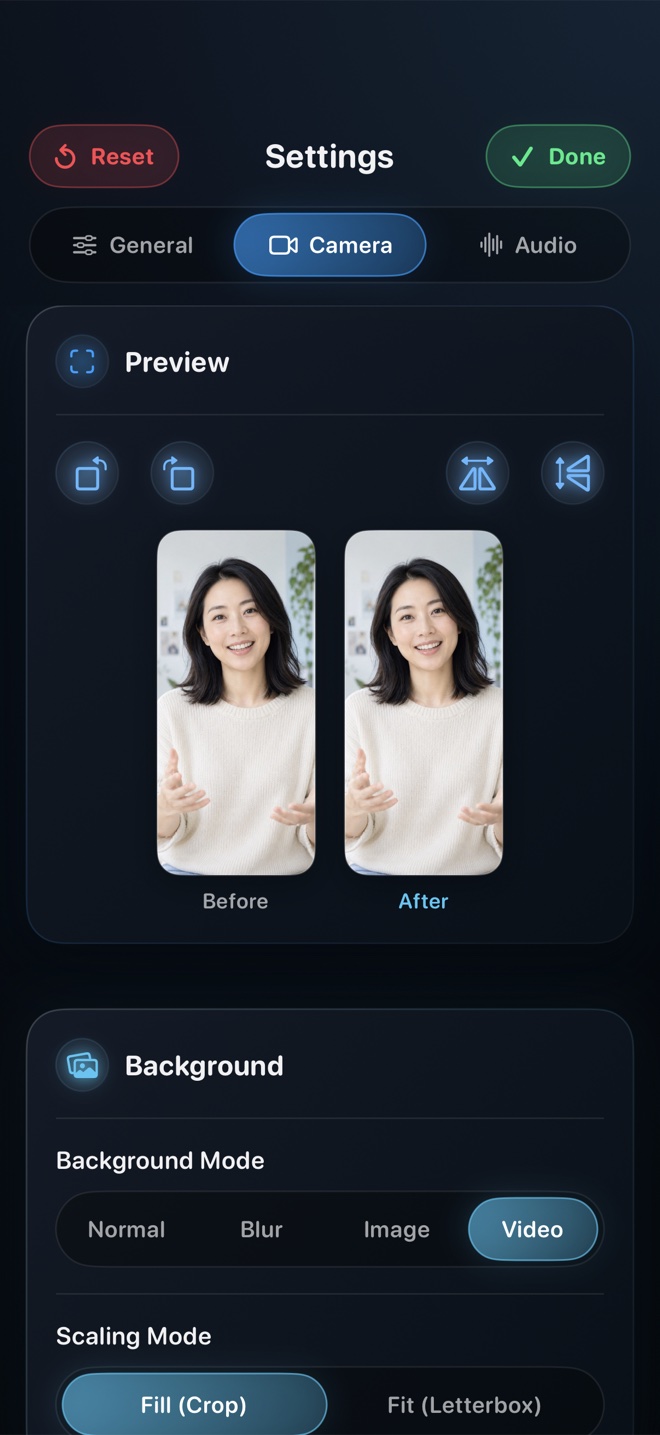
Pick Reel Screen Recorder when you want a genuine live floating facecam over third-party iPhone apps in a single take—complete with on-device background blur, balanced app + mic audio, free 1080p MP4 output, and optional $0.99/mo or $14.99 lifetime Native Retina Pro. Pick a two-camera + CapCut/Final Cut setup only if you require an external mirrorless cinema lens, or a post-commentary editor if you prefer scripting voiceover after filming silent gameplay.
| Capability | Reel Screen Recorder (Live PiP) | Post-Recording Facecam Apps | Two-Device Camera + NLE Sync |
|---|---|---|---|
| Live facecam visible while using other apps | Yes — Picture-in-Picture camera floats live over third-party apps | No — you record the screen alone first, then layer facecam in pass two | Separate external camera films your face beside the phone |
| Total recording & sync passes | Single pass — stop broadcast and your composited MP4 is done | Two passes — capture screen, import clip, record reaction, render export | Two captures + manual clap/waveform sync on an editing timeline |
| Natural eye-line & real-time reaction timing | Natural — your expressions match every tap and surprise in real time | Rehearsed — reacting to a replay loses live tap-to-speech rhythm | Natural, though looking between phone and tripod splits eye-line |
| On-device camera background blur / replacement | Yes — built-in neural blur + custom photo/video loop backdrop | Rarely included or locked behind steep weekly subscriptions | Depends on physical lens bokeh or desktop NLE masking |
| Independent app audio + mic balance | Yes — pre-broadcast gain & mute sliders mixed to stereo MP4 | Balanced on timeline during second pass | Balanced manually across separate timeline audio tracks |
| Portrait & landscape orientation lock | Yes — lock framing before starting broadcast | Set during post-export canvas selection | Configured manually in project timeline settings |
Why So Many 'Facecam Recorder' Apps Only Add Camera After Recording
If you have ever downloaded three screen recorders from the App Store in frustration, you encountered a real iOS sandboxing rule: a normal iPhone app loses foreground camera preview the instant you swipe to the Home Screen. Rather than engineering a live Picture-in-Picture pipeline synchronized with a ReplayKit Broadcast Extension, dozens of older utility apps simply record your screen alone and ask you to film your face later while watching the playback.
Post-commentary works fine when analyzing a replay, but it feels noticeably detached during software walkthroughs. Viewers can tell when your voiceover is reacting half a second late to taps you made ten minutes earlier.
How Live Picture-in-Picture Solves Eye-Line and Single-Take Speed
Reel Screen Recorder keeps your live camera feed running inside an iOS Picture-in-Picture window while its ReplayKit Broadcast Extension captures the full screen. Because your facecam floats right over the app you are demonstrating, you talk naturally as you tap—and because you are looking straight at the iPhone screen, your eye-line sits inches from the TrueDepth front camera.
When you tap Stop Broadcast, there is no second pass and no ten-minute export progress bar: your composited HEVC MP4 is already saved locally on your iPhone.
| Technical Dimension | Reel Screen Recorder | Typical Post-Commentary Apps | Two-Device + NLE Workflow |
|---|---|---|---|
| Capture pipeline on iOS | ReplayKit Broadcast Extension + AVPictureInPictureController | ReplayKit raw screen capture → custom post-recording video wrapper | Control Center screen capture + external camera → CapCut / Final Cut |
| Free export resolution | 480p, 720p, and 1080p MP4 included free (with ads) | Often caps free exports at 720p, 3 minutes, or adds watermarks | Full resolution (requires 2x storage + export render time) |
| Max resolution available | Source (Native) full Retina resolution via Reel Pro | Typically 1080p re-encoded inside wrapper editor | Up to 4K60 depending on external camera and NLE |
| Audio container compatibility | Single-track stereo HEVC MP4 default + optional two-track preservation | Single re-encoded AAC track after second-pass export | Full multi-track timeline export |
| Privacy & cloud uploads | 100% local on-device MP4; no account or cloud upload | Varies widely; check App Privacy nutrition labels carefully | 100% local if edited offline; AirDrop/SSD transfer required |
Avoiding Weekly Subscription Dark Patterns in Utility Recorders
The mobile screen-recorder category on iOS is notorious for aggressive weekly auto-renewing paywalls—often $6.99 to $9.99 per week after a 3-day trial just to export longer than three minutes or remove a corner watermark. Over twelve months, a forgotten weekly utility subscription costs more than Final Cut Pro.
Reel takes the opposite stance: 480p, 720p, and crisp 1080p recording—with no length cap, no watermark, full PiP facecam, audio mixing, and neural background blur—are free with ad support. Removing ads and unlocking Source (Native) Retina resolution costs $0.99/month, $9.99/year, or $14.99 once for life.
| Pricing / Creator Scenario | Best Approach | Why It Makes Sense |
|---|---|---|
| Typical App Store cost | Reel ($0 up to 1080p; $0.99/mo, $9.99/yr, or $14.99 lifetime Pro) | Avoids the $5.99–$9.99/week ($300+/year) subscription traps common in utility clones |
| Daily TikTok / Reels / Shorts app tutorials | Reel Screen Recorder | Single-take vertical MP4 with direct eye contact into the front iPhone camera |
| Fast-twitch ranked mobile gaming where speaking live distracts play | Post-Recording Voiceover / CapCut | Focus 100% on winning the match first, then narrate strategy calmly over the replay |
| Flagship YouTube documentary with shallow-DOF studio camera | Two-Device Mirrorless + Desktop NLE | Lets you cut between full-screen 4K talking head and tight mobile UI inserts |
| Indie developer recording product updates on iPhone, iPad & Mac | Reel Screen Recorder | One universal app and one $14.99 lifetime Pro option across all three Apple platforms |
Frequently Asked Questions
Can I move or resize the Picture-in-Picture facecam while recording another iPhone app?
Yes. Standard iOS Picture-in-Picture gestures let you drag the floating camera bubble to a different screen corner whenever it covers an important button or navigation bar in the app you are demonstrating.
Does Reel put a watermark on free 1080p recordings?
No. Free recordings at 480p, 720p, and 1080p are ad-supported inside the app interface rather than stamping watermarks onto your saved MP4 videos.
Can I blur a messy room behind me on iPhone without a green screen?
Yes. Reel runs on-device neural person segmentation to blur your background or place a custom photo or looping video behind you in real time.
Related Comparisons & Production Guide
Recording iPhone Internal App Audio + Microphone: 4 Methods Compared
Compare 4 ways to capture iPhone internal app sound and voice commentary together: Reel's audio mixer vs Control Center, USB-C Mac capture, and post-voiceover.
Local MP4 Screen Recorders vs Cloud Workspace Recorders Compared
Compare local on-device MP4 screen recorders (Reel, OBS, QuickTime) against cloud workspace recorders (Loom, Vidyard, Tella) on privacy, speed, and SaaS cost.