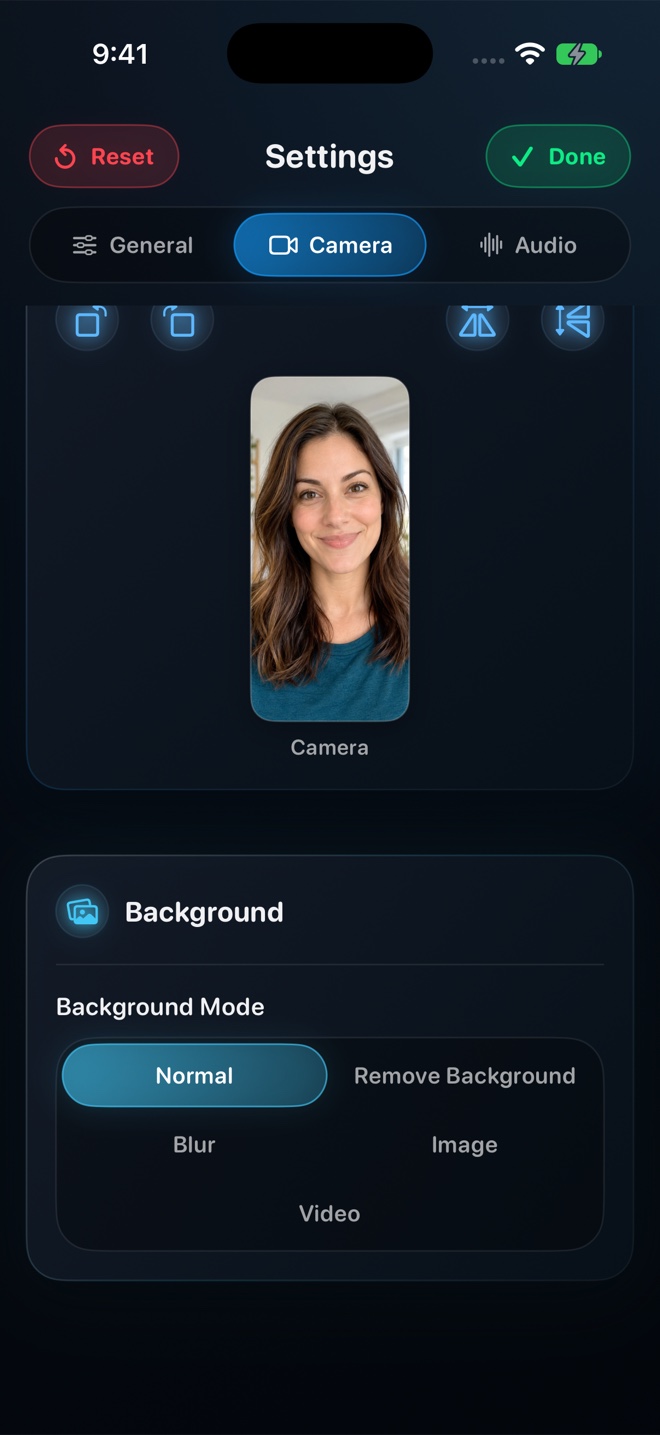
XRecorder's famous floating brush and overlay ball are Android-specific features; on iPhone, pair Reel Screen Recorder ($0 free watermark-free 1080p MP4, live cross-app PiP facecam, audio mixer) with InShot or CapCut only when you need post-capture stickers or captions. For fast screen-only clips without a camera or mixer, use Apple's built-in Control Center recorder ($0).
| Feature | Reel Screen Recorder (iPhone/iPad/Mac) | iOS Built-In + InShot Video Editor | XRecorder (Android Benchmark) |
|---|---|---|---|
| No watermark & no recording time limit | Yes — free up to 1080p MP4 | Control Center free; InShot free adds logo unless removed | Yes on Android base tier |
| Live floating facecam across apps | Yes — native iOS Picture-in-Picture | No live cross-app facecam | Yes via Android overlay |
| Internal audio + microphone level balance | Yes — independent sliders in Reel | No pre-capture mixer in Control Center | Android 10+ internal + mic |
| Camera background blur / replacement | Yes — on-device neural segmentation | Only on post-recorded layers in editor | Limited camera shape/cutout |
| Post-recording stickers, music & speed ramps | No — focused on clean single-take MP4 capture | Yes — InShot video editor excels at post effects | Built-in lightweight editor |
| macOS desktop companion | Yes — universal Mac app included | No Mac InShot app | Android only |
Why InShot Separates Editing from OS Recording on iPhone
On Android, XRecorder bundles screen capture and quick trimming into one package because Google Play allows foreground overlay services. On iOS, InShot's flagship presence is the InShot Video Editor—which edits clips already in your Camera Roll rather than floating a live camera over third-party iPhone apps.
Reel fills that exact capture gap on iOS and iPadOS: it handles the live ReplayKit broadcast, floating Picture-in-Picture facecam, neural background blur, and internal-plus-mic audio balance so the MP4 landing in your Photos library is clean on take one.
Avoiding Double Compression When You Don't Need Timeline Cuts
Every time you run a screen recording through a mobile video editor just to shrink its resolution or duck background volume, you wait through a second re-encoding pass that softens crisp UI typography. Setting 1080p quality and balancing audio levels inside Reel *before* hitting Start Broadcast produces a sharp first-generation MP4 ready for immediate upload.
| Technical Dimension | Reel Screen Recorder (iOS) | Control Center + Mobile Editor |
|---|---|---|
| Export generation count | 1st-generation hardware HEVC .mp4 straight from capture | 2nd-generation re-encode if processed through mobile editor |
| Resolution tiers | 480p, 720p, 1080p (free) + Source Native Retina (Reel Pro) | Native Retina capture → 1080p/4K editor render |
| Orientation lock | Explicit Portrait or Landscape lock before capture | Follows app rotation |
| Audio track compatibility | Single-track stereo default + optional two-track MP4 | Single mixed track |
| Data privacy | Zero servers, no login, 100% local files | Local files |
Transparent Pricing Without Copycat Traps
Many apps ranking for 'XRecorder' keywords on iOS are unrelated clones with steep weekly fees. Reel is transparently published by Arte Soft EOOD, keeps 480p–1080p completely free without watermarks, and offers a $14.99 lifetime Pro option.
| Creator Goal | Best iPhone Setup | Why |
|---|---|---|
| One-take gameplay or app walkthrough with facecam | Reel Screen Recorder ($0 free 1080p) | Captures screen, PiP facecam, and balanced audio in one clean MP4 |
| Heavily edited montage with animated stickers & transitions | Capture in Reel → Edit in InShot or CapCut | Reel nails the live PiP + audio capture; InShot/CapCut handles timeline polish |
| Ad-free Native Retina capture across iPhone, iPad & Mac | Reel Pro ($0.99/mo, $9.99/yr, or $14.99 lifetime) | One small Apple ID purchase covers all three Apple device classes |
| 5-second silent UI bug clip | iOS Control Center | Zero app launch required |
Frequently Asked Questions
Does InShot make an official XRecorder app with Android-style floating brushes on iPhone?
iOS security rules prevent third-party apps from drawing floating ink brushes over other apps. Use Reel for live PiP facecam + screen capture, and import into InShot or CapCut if you want post-recording text callouts.
Can Reel lock 9:16 portrait or 16:9 landscape before recording?
Yes. Reel's orientation lock prevents mid-recording rotation glitches.
Are free 1080p exports in Reel watermark-free?
Yes—zero watermarks on all quality tiers.
Related Comparisons & Production Guide
Reel Screen Recorder vs Loom Mobile App on iPhone & iPad
Compare Reel Screen Recorder vs Loom iOS on iPhone and iPad: live cross-app PiP facecam, unlimited free 1080p local MP4s, and offline capture vs cloud links.
Reel Screen Recorder vs TechSmith Capture & Camtasia
Compare Reel Screen Recorder vs TechSmith Capture and Camtasia: standalone iPhone, iPad, and Mac MP4 + PiP facecam capture vs desktop e-learning timelines.